Asynchronous Database Calls With Task-based Asynchronous Programming Model (TAP) in ASP.NET MVC 4
Asynchronous Database Calls With Task-based Asynchronous Programming Model (TAP) in ASP.NET MVC 4 and its performance impacts.
9 April 2012
6 minutes read
Related Posts








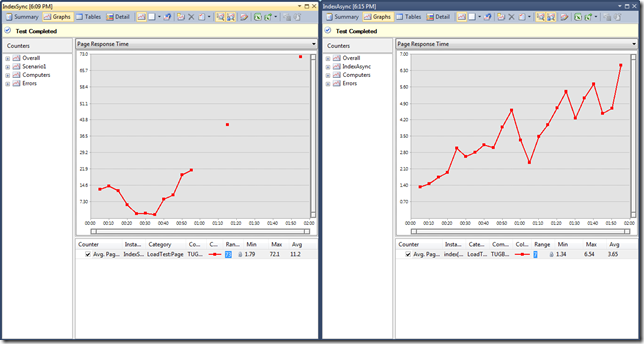





You have probably seen some people who are against asynchronous database calls in ASP.NET web applications so far. They mostly right but there are still some cases that processing database queries asynchronous has very important impact on.
If you are unfamiliar with asynchronous programming model on ASP.NET MVC 4, you might want to read one of my previous posts: Asynchronous Programming in C# 5.0 and ASP.NET MVC Web Applications.
Update on the 11th of April, 2012:
@BradWilson has just started a new blog post series on using Task Parallel Library when writing server applications, especially ASP.NET MVC and ASP.NET Web API applications. You should certainly check them out: Task Parallel Library and Servers, Part 1: Introduction
Update on the 1st of July, 2012:
@RickAndMSFT has a new tutorial on Using Asynchronous Methods in ASP.NET MVC 4. Definitely check that out.
One of the reasons why asynchronous programming is not recommended for database calls is that it is extremely hard to get it right, even if we adopt Task-based Asynchronous Programming in .NET 4.0. But, with the new async / await features of C# 5.0, it is easier and still complex at the same time.
When you call a method which returns Task or Task<T> for some T and await on that, the compiler does the heavy lifting by assigning continuations, handling exceptions and so on. Because of this fact, it adds a little overhead and you might notice this when you are dealing with short running operations. At that point, asynchrony will do more harm than good to your application.
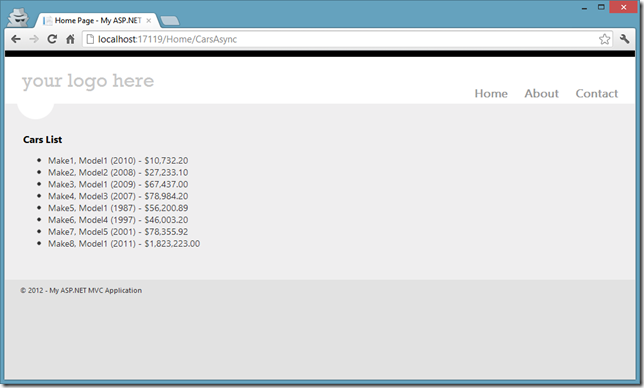
Let’s assume we have a SQL Server database out there somewhere and we want to query against that database in order to get the cars list that we have. I have created a class which will do the query operations and hand us the results as C# CLR objects.
public class GalleryContext : IGalleryContext {

    private readonly string selectStatement = "SELECT * FROM Cars";

    public IEnumerable<Car> GetCars() {

        var connectionString =
            ConfigurationManager.ConnectionStrings["CarGalleryConnStr"].ConnectionString;

        using (var conn = new SqlConnection(connectionString)) {
            using (var cmd = new SqlCommand()) {

                cmd.Connection = conn;
                cmd.CommandText = selectStatement;
                cmd.CommandType = CommandType.Text;

                conn.Open();

                using (var reader = cmd.ExecuteReader()) {

                    return reader.Select(r => carBuilder(r)).ToList();
                }
            }
        }
    }

    public async Task<IEnumerable<Car>> GetCarsAsync() {

        var connectionString =
            ConfigurationManager.ConnectionStrings["CarGalleryConnStr"].ConnectionString;

        var asyncConnectionString = new SqlConnectionStringBuilder(connectionString) {
            AsynchronousProcessing = true
        }.ToString();

        using (var conn = new SqlConnection(asyncConnectionString)) {
            using (var cmd = new SqlCommand()) {

                cmd.Connection = conn;
                cmd.CommandText = selectStatement;
                cmd.CommandType = CommandType.Text;

                conn.Open();

                using (var reader = await cmd.ExecuteReaderAsync()) {

                    return reader.Select(r => carBuilder(r)).ToList();
                }
            }
        }
    }

    //private helpers
    private Car carBuilder(SqlDataReader reader) {

        return new Car {

            Id = int.Parse(reader["Id"].ToString()),
            Make = reader["Make"] is DBNull ? null : reader["Make"].ToString(),
            Model = reader["Model"] is DBNull ? null : reader["Model"].ToString(),
            Year = int.Parse(reader["Year"].ToString()),
            Doors = int.Parse(reader["Doors"].ToString()),
            Colour = reader["Colour"] is DBNull ? null : reader["Colour"].ToString(),
            Price = float.Parse(reader["Price"].ToString()),
            Mileage = int.Parse(reader["Mileage"].ToString())
        };
    }
}
You might notice that I used a Select method on SqlDataReader which does not exist. It is a small extension method which makes it look prettier.
public static class Extensions {

    public static IEnumerable<T> Select<T>(
        this SqlDataReader reader, Func<SqlDataReader, T> projection) {

        while (reader.Read()) {
            yield return projection(reader);
        }
    }
}
As you can see, it has two public methods to query the database which does the same thing but one of them doing it as synchronously and the other one as asynchronously.
Inside the GetCarsAsync method, you can see that we append the AsynchronousProcessing property and set it to true in order to run the operation asynchronously. Otherwise, no matter how you implement it, your query will be processed synchronously.
When you look behind the curtain, you will notice that ExecuteReaderAsync method is really using the old Asynchronous Programming Model (APM) under the covers.
public static Task<SqlDataReader> ExecuteReaderAsync(this SqlCommand source)
{
    return Task<SqlDataReader>.Factory.FromAsync(
        new Func<AsyncCallback, object, IAsyncResult>(source.BeginExecuteReader),
        new Func<IAsyncResult, SqlDataReader>(source.EndExecuteReader),
        null
    );
}
When we try to consume these methods inside our controller, we will have the following implementation.
public class HomeController : Controller {

    private readonly GalleryContext ctx = new GalleryContext();

    public ViewResult Index() {

        return View(ctx.GetCars());
    }

    public async Task<ViewResult> IndexAsync() {

        //workaround: http://aspnetwebstack.codeplex.com/workitem/22
        await TaskEx.Yield();

        return View("Index", await ctx.GetCarsAsync());
    }
}
Now, when we hit /home/Index, we will be querying our database as synchronously. If we navigate to /home/IndexAsync, we will be doing the same thing but asynchronously this time. Let’s do a little benchmarking with Apache HTTP server benchmarking tool.
First, we will simulate 50 concurrent requests on synchronously running wev page:
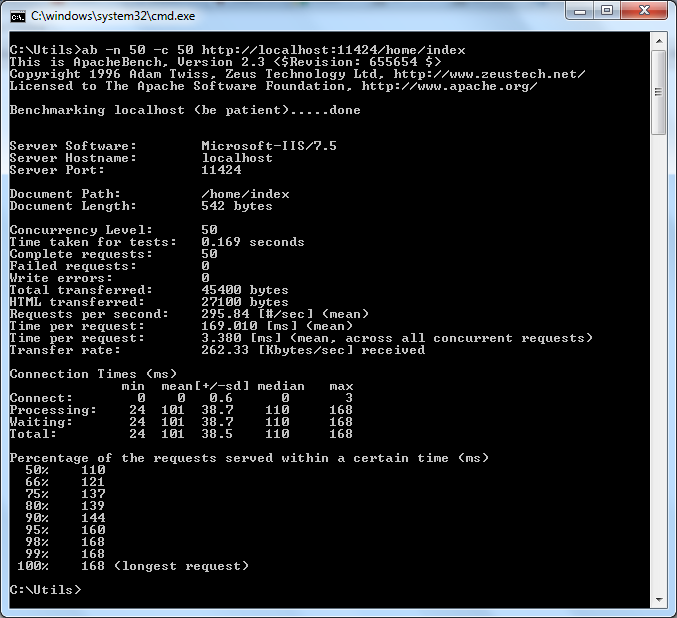
Let’s do the same thing for asynchronous one:
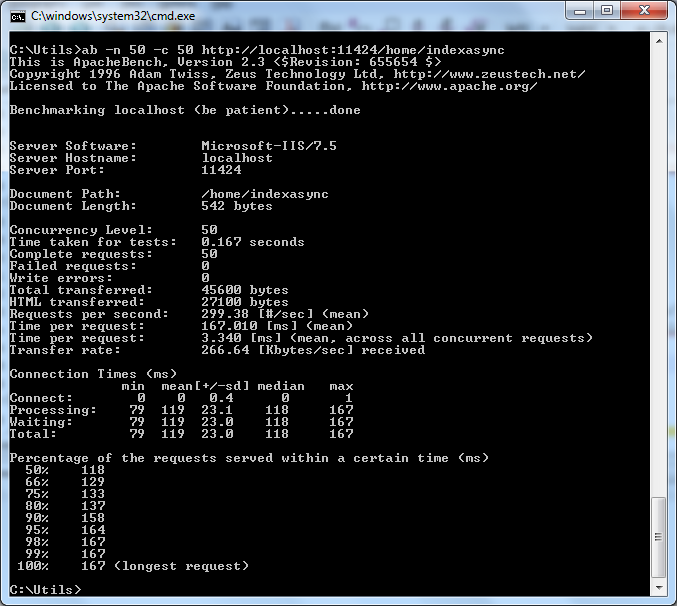
Did you notice? We have nearly got the same result. In fact, you will see that synchronous version of the operation completes faster than the asynchronous one at some points. The reason is that the SQL query takes small amount of time (approx. 8ms) here to complete.
Let’s take another scenario. Now, we will try to get the same data through a Stored Procedure but this time, the database call will be slow (approx. 1 second). Here are two methods which will nearly the same as others:
private readonly string spName = "sp$GetCars";

public IEnumerable<Car> GetCarsViaSP() {

    var connectionString = ConfigurationManager.ConnectionStrings["CarGalleryConnStr"].ConnectionString;

    using (var conn = new SqlConnection(connectionString)) {
        using (var cmd = new SqlCommand()) {

            cmd.Connection = conn;
            cmd.CommandText = spName;
            cmd.CommandType = CommandType.StoredProcedure;

            conn.Open();

            using (var reader = cmd.ExecuteReader()) {

                return reader.Select(r => carBuilder(r)).ToList();
            }
        }
    }
}

public async Task<IEnumerable<Car>> GetCarsViaSPAsync() {

    var connectionString = ConfigurationManager.ConnectionStrings["CarGalleryConnStr"].ConnectionString;
    var asyncConnectionString = new SqlConnectionStringBuilder(connectionString) {
        AsynchronousProcessing = true
    }.ToString();

    using (var conn = new SqlConnection(asyncConnectionString)) {
        using (var cmd = new SqlCommand()) {

            cmd.Connection = conn;
            cmd.CommandText = spName;
            cmd.CommandType = CommandType.StoredProcedure;

            conn.Open();

            using (var reader = await cmd.ExecuteReaderAsync()) {

                return reader.Select(r => carBuilder(r)).ToList();
            }
        }
    }
}
I was able to make the SQL query long running by waiting inside the stored procedure for 1 second:
ALTER PROCEDURE dbo.sp$GetCars
AS

-- wait for 1 second
WAITFOR DELAY '00:00:01';

SELECT * FROM Cars;
Controller actions are nearly the same as before:
public class HomeController : Controller {

    private readonly GalleryContext ctx = new GalleryContext();

    public ViewResult IndexSP() {

        return View("Index", ctx.GetCarsViaSP());
    }

    public async Task<ViewResult> IndexSPAsync() {

        //workaround: http://aspnetwebstack.codeplex.com/workitem/22
        await TaskEx.Yield();

        return View("Index", await ctx.GetCarsViaSPAsync());
    }
}
Let’s simulate 50 concurrent requests on synchronously running web page first:

Ok, that’s apparently not good. As you might see, some requests take more than 8 seconds to complete which is very bad for a web page. Remember, the database call takes approx. 1 second to complete and under a particular number of concurrent requests, we experience a very serious bottleneck here.
Let’s have a look at the asynchronous implementation and see the difference:
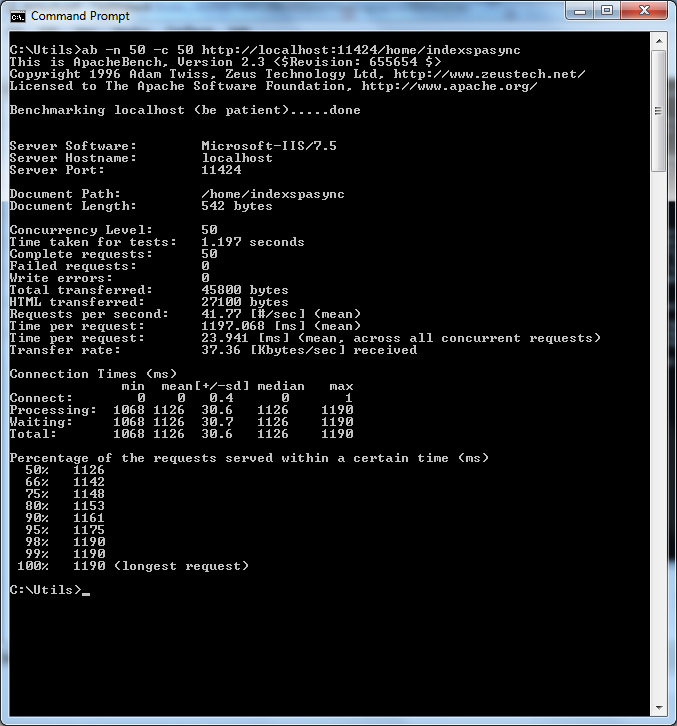
Approximately 1 second to complete for each request, pretty impressive compared to synchronous implementation.
Asynchronous database calls are not as straight forward as other types of asynchronous operations but sometimes it will gain so much more responsiveness to our applications. We just need to get it right and implement them properly.

Hey, I'm Tugberk 👋
Coder 👨🏻💻, Speaker 🗣, Author 📚, ex-Microsoft MVP 🕸, Blogger 💻
I live in London, UK 🏡
