rss
[ Log On ]

Deployment of ASP.Net MVC 3 RC 2 Application on a Shared Hosting Environment Without Begging The Hosting Company

After the release of ASP.Net MVC RC 2, we are now waiting for the RTM release but some of us wanna use RC 2 already... But how to deploy it on a shared hosting acount is the mind-exploding problem...
12/18/2010 2:41:29 PM 15 comments 26473 times

UPDATE on 2011, 02.26

I have wrote another blog post on ASP.NET MVC Deployment problems you might have related to your server. If you are still having problems (especially, if you are getting 404 exceptions for extensionless URLs), you might want to have a look at on "Running ASP.NET MVC Under IIS 6.0 and IIS 7.0 Classic Mode : Solution to Routing Problem"

asp-net-mvc-3.gifOn the 10th of December in 2010, Microsoft ASP.Net MVC team has released the MVC 3 RC 2 and it has some good stuff inside which RC 1 didn't have. It is not so much different but there are some breaking changes, especially ViewBag thing.

You could find more information about ASP.Net MVC RC 3 goodies on ScootGu's blog post or Phil Haacked blog post.

The MVC 3 RC 2 has come from go-live-license so you can use this in production if you wish. But the main problem rises here if you are in a shared hosting environment. As you know, shared hosting providers are not willing to install the new releases unless it is for sure that there is no detected bug in the package.

I thought that would be a big problem for me [because I am still in shared hosting environment :)] but deploying the necessary assemblies as manually is the solution. Scott Hanselman has a great post on how to deploy an MVC 3 application into a shared hosting environment. The article covers all the necessary steps. One problem is that if you do exactly as it is there, you will sure have a problem if you are deploying the RC 2 of the MVC 3.

The yellow screen of death will give you the following error;

Could not load file or assembly 'System.Web.WebPages.Deployment, Version=1.0.0.0, Culture=neutral, PublicKeyToken=31bf3856ad364e35' or one of its dependencies. The system cannot find the file specified.

The error will be thrown by the system because it needs System.Web.WebPages.Deployment.dll as well. The solution of this little problem is simple;

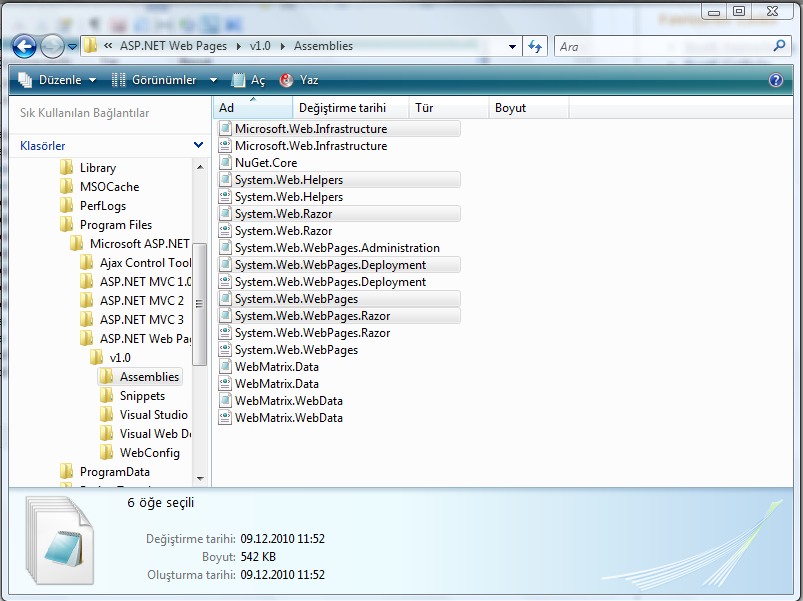
Navigate to C:\Program Files\Microsoft ASP.NET\ASP.NET Web Pages\v1.0\Assemblies (this could be C:\Program Files (x86)\Microsoft ASP.NET\ASP.NET Web Pages\v1.0\Assemblies on Windows 7) inside the windows explorer and you will see some files inside the folder;
asp.net-mvc-3-rc-2-bin-deployment-shared-hosting-environment-full.PNG

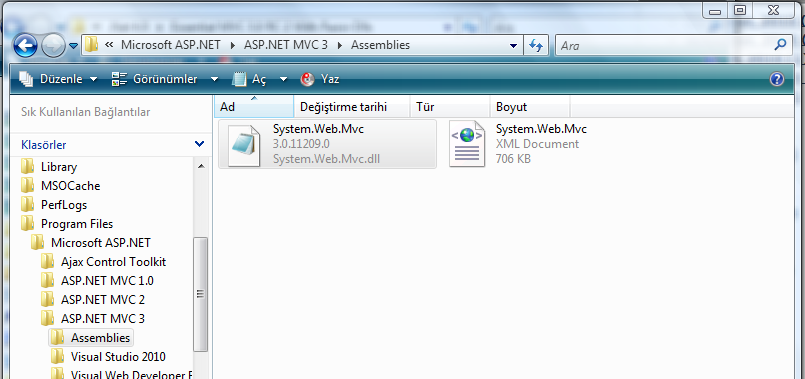
You need those 6 dll files. In addition to that you will also need System.Web.Mvc.dll (version 3.0.11209.0). You will be able to find that dll file by navigating to C:\Program Files\Microsoft ASP.NET\ASP.NET MVC 3\Assemblies (that should be C:\Program Files (86x)\Microsoft ASP.NET\ASP.NET MVC 3\Assemblies in Windows 7 [I'm not sure though])
asp.net-mvc-3-rc-2-bin-deployment-shared-hosting-environment-mvc-folder.PNG

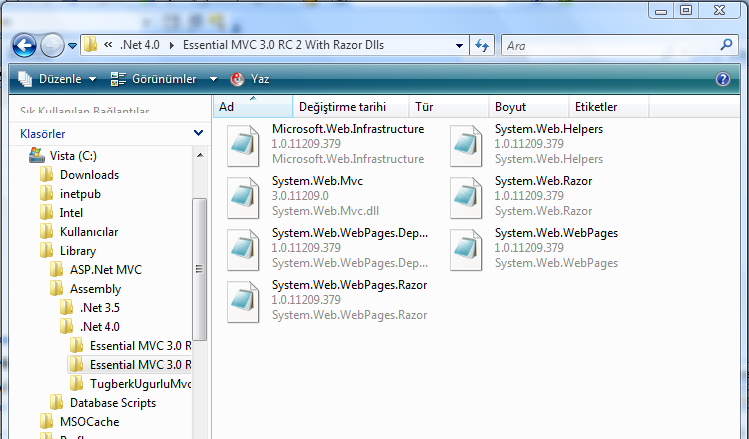
Finally you should all have the following dlls in hand;

  • Microsoft.Web.Infrastructure
  • System.Web.Razor
  • System.Web.WebPages
  • System.Web.WebPages.Razor
  • System.Web.Helpers
  • System.Web.WebPages.Deployment (If you are deploying MVC RC 2, this assembly is necessary to deploy)
  • System.Web.Mvc

I made a copy of those dlls and put them together inside a folder so that I could reach them easily whenever I need them;
essential-MVC-3-0-RC-2-with-razor-dlls.PNG

We have all the necessary files in our hands and so what now !

There are some conventions here that you could choose. The way I follow is that;

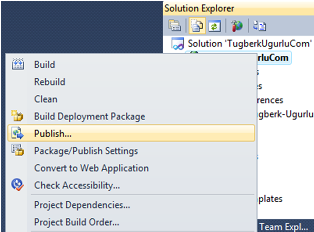
  • I used built in Visual Studio Publish tool to publish my application to the production side.
  • After publishing was complated, I simply copied those 7 dll files into the bin folder inside the root directory of my application.
visual-studio-2010-publish-tool-goodies.png
Visual Studio 2010 Publish Tool

That was it ! [Of cource I didn't put the System.Web.WebPages.Dployment.dll into the production side and I got the error firstly :)]

Finally, my bin folder has the necessary assembly files to run the application;
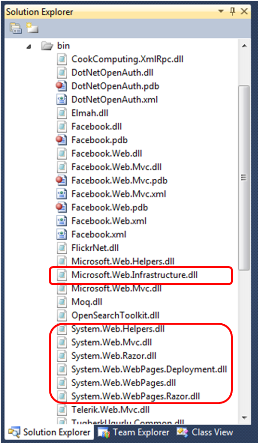
magic-bin-folder-of-asp-net-mvc-3-rc-2-application.png

Conclusion


Shared hostigs suck ! I know but it is the easiest way of setting up a web site. Thanks to the dll files and bin folder, we could deploy whatever we need into a shared hosting environment without begging the hosting company. The other smilar issue like that was Chart Contols. Refer : www.tugberkugurlu.com/archive/asp-net-chart-control-on-shared-hosting-environment-chartimagehandler-parser-error-problem-solution
Permalink Add to del.icio.usDigg!Share on FacebookShare on Google BuzzReddit!Stumble it!

Comments

gravatar
#142
re: Deployment of ASP.Net MVC 3 RC 2 Application on a Shared Hosting Environment Without Begging The Hosting Company
by Kevin on 12/28/10 13:42:52 Tuesday (UTC +00:00)

I have a running mvc website inside a shared hosting environment thanks to this post.


gravatar
#366
re: Deployment of ASP.Net MVC 3 RC 2 Application on a Shared Hosting Environment Without Begging The Hosting Company
by C++ Source Code Directory on 01/17/11 9:47:45 Monday (UTC +00:00)

Appreciate the research.


gravatar
#1058
re: Deployment of ASP.Net MVC 3 RC 2 Application on a Shared Hosting Environment Without Begging The Hosting Company
by Haris on 01/26/11 22:37:52 Wednesday (UTC +00:00)

really solved m problem thanks ! do you know how we could make it possible to publish the neccessary all 7 dll filles while we are publishing the site with VS 2010 publish tool ??

Thanks

Haris


gravatar
#2063
re: Deployment of ASP.Net MVC 3 RC 2 Application on a Shared Hosting Environment Without Begging The Hosting Company
by CCNA training on 02/08/11 14:41:47 Tuesday (UTC +00:00)

Nice article, I am a big time fan of your site, keep up the nice work, and I will be a frequent visitor for a very long time.


gravatar
#2064
re: Deployment of ASP.Net MVC 3 RC 2 Application on a Shared Hosting Environment Without Begging The Hosting Company
by Tugberk on 02/09/11 22:11:23 Wednesday (UTC +00:00)

CCNA training

Nice article, I am a big time fan of your site, keep up the nice work, and I will be a frequent visitor for a very long time.

Thanks. glad that it helped. hope to see your comments often.


gravatar
#2066
re: Deployment of ASP.Net MVC 3 RC 2 Application on a Shared Hosting Environment Without Begging The Hosting Company
by nihan on 02/15/11 22:22:59 Tuesday (UTC +00:00)
Thanks...
gravatar
#2074
re:
by link building services on 02/24/11 8:57:24 Thursday (UTC +00:00)

Its very interesting.keep it up.I found many interesting points it contains a lot of information.


gravatar
#2084
re: Deployment of ASP.Net MVC 3 RC 2 Application on a Shared Hosting Environment Without Begging The Hosting Company
by Stuart on 03/15/11 7:21:03 Tuesday (UTC +00:00)

thanks a LOT for sharing this valuable discussion!


gravatar
#2122
re: Deployment of ASP.Net MVC 3 RC 2 Application on a Shared Hosting Environment Without Begging The Hosting Company
by Gideon on 05/18/11 16:55:33 Wednesday (UTC +00:00)

thanks man really saved me some hair


gravatar
#2123
re: Deployment of ASP.Net MVC 3 RC 2 Application on a Shared Hosting Environment Without Begging The Hosting Company
by Gideon on 05/18/11 16:56:25 Wednesday (UTC +00:00)

thanks man really saved me some hair


gravatar
#2124
re: Deployment of ASP.Net MVC 3 RC 2 Application on a Shared Hosting Environment Without Begging The Hosting Company
by tugberk on 05/18/11 17:53:58 Wednesday (UTC +00:00)

@Gideon

:) glad that it helped. consider looking at the following one as well for possible future complications;

http://tugberkugurlu.com/archive/running-asp-net-mvc-under-iis-6-0-and-iis-7-0-classic-mode---solution-to-routing-problem


gravatar
#2239
re: Deployment of ASP.Net MVC 3 RC 2 Application on a Shared Hosting Environment Without Begging The Hosting Company
by jual emping on 11/14/11 6:24:22 Monday (UTC +00:00)

I am glad to read your post and to be part of it. I will be back to check more of your post.


gravatar
#2344
re: Deployment of ASP.Net MVC 3 RC 2 Application on a Shared Hosting Environment Without Begging The Hosting Company
by Matt on 02/14/12 1:37:34 Tuesday (UTC +00:00)

I'm getting this deployment excpt its asking for version 2.0 and im running it on my local machine. any thoughts ? Thanks 


gravatar
#2523
re: Deployment of ASP.Net MVC 3 RC 2 Application on a Shared Hosting Environment Without Begging The Hosting Company
by jannat fizza on 06/03/12 15:54:11 Sunday (UTC +00:00)

anyone here help to make harris point detection   implementation in . NET


gravatar
#2611
GSM Mobiles
by uamir on 07/23/12 6:39:42 Monday (UTC +00:00)

hey that's really a great post about 

Deployment of ASP.Net MVC 3 RC 2 Application on a Shared Hosting Environment Without Begging The Hosting Company 

 and i like this and thanks for sharing it with us!


Additional allowed tags : [quote]...[/quote], [user]...[/user]
:
:
: will not be displayed ! (but will show your Gravatar)
:
: