TinyMCE HTML Text Editior & ASP.NET MVC - Setting It Up Has Become Easy With Nuget
Couple of weeks ago, I was setting up a new project and I have created a folder called ‘lib’ inside the $(SolutionDir) as usual to put all the dependencies that I am going to be using for my project (.Net libraries, JavaScript libraries, etc.).
Then, I go to http://www.tinymce.com/ to grab the latest version of TinyMCE which is an awesome Javascript WYSIWYG Editor. This action popped up a balloon inside my head that tells me I had been doing this stuff over and over again for 80% of the projects that I have created. So this hits me hard and I thought I should automate this process. In order to do that, I’ve created an internal Nuget package just for myself to pull the TinyMCE package with plugins. Even, I have created EditorTemplates so that I could just give my model a hint to use the template.
That worked pretty well for me but don’t miss the point here. That worked pretty well only for me. Not for John, Denis, Adam and so on. After I thought this, I have come across a blog post about TinyMCE integration on ASP.NET MVC 3 (The blog post is in Turkish). Remember the balloon which popped up inside my head? This blog post widened that balloon and it hit me harder this time. The process which has been documented there is a very well working sample but well…, it looked more like a poor man’s TinyMCE integration for me. (The article was nice but it wasn’t following the DRY way)
After that, I have decided to enhance my packages to push them to live Nuget feed. So, I have contacted with the package admins on their forum :
@Spocke has replied my post in a short time and gave me a go ahead to push the package to live Nuget feed. I am not going to get into details of how I created the package. Mostly, I will show how to set up your environment to get TinyMCE working in a short time.
TinyMCE into an ASP.NET MVC project
It is now easy to get TinyMCE package to your project with Nuget. It’s even easier to get it working with ASP.NET MVC. In this post, I am going show you the easiest way to get it work ASP.NET MVC but I hope I am going to cover for Web Forms as well in near future.
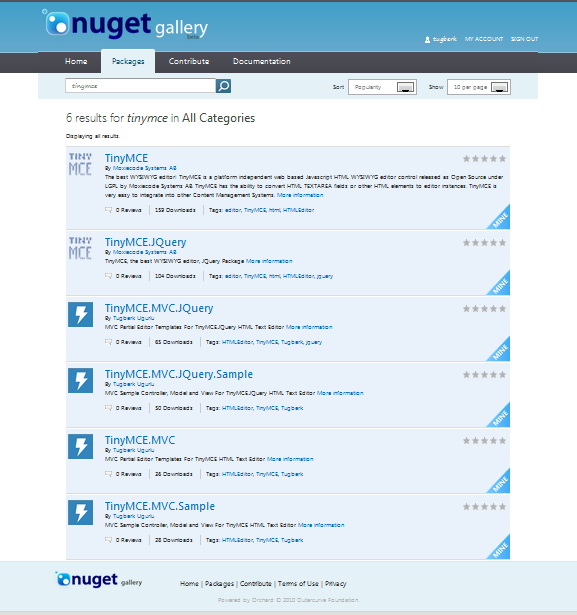
There are several packages which are related to TinyMCE that I have pushed to live Nuget feed as you can see in the picture left hand side. (This list might extend in the future) Briefly the packages are :
TinyMCE : The main package which holds the infrastructure .js files of the library and plugings. This package has no dependency at all.
TinyMCE.JQuery : Holds the JQuery integration files for TinyMCE. This package depends on TinyMCE and JQuery packages.
TinyMCE.MVC : This package holds the ASP.NET MVC EditorTemplates for TinyMCE. This package depends on TinyMCE package.
TinyMCE.MVC.JQuery : Holds the ASP.NET MVC EditorTemplates for TinyMCE.JQuery. This package depends on TinyMCE.JQuery package.
TinyMCE.MVC.Sample : Holds a sample ASP.NET MVC mini Application (it is all just a model, a controller and a view) for TinyMCE. This package depends on TinyMCE.MVC package so it uses EditorTemplates to illustrate a sample.
TinyMCE.MVC.JQuery.Sample : This package holds a sample ASP.NET MVC mini Application (it is all just a model, a controller and a view) for TinyMCE.JQuery. This package depends on TinyMCE.MVC.JQuery package so it uses EditorTemplates to illustrate a sample.
How to get TinyMCE work on and ASP.NET MVC project
I would like set the boundaries here :
- This will demonstrate the process of integrating TinyMCE to an ASP.NET MVC application.
- I will use the JQuery one because it has more downloads on Nuget

- I will work with the TinyMCE.JQuery.MVC package to pull down all the TinyMCE stuff along with ASP.NET MVC EditorTemplates.
Always first thing to go is File > New Project > ASP.NET MVC 3 Web Application.
In order to make it more clear, I have created a very simple BlogPost model to work with. First, I am going to show you the way without TinyMCE then later we will bring it down through Nuget.
The model looks like as below :
public class BlogPost {
public string Title { get; set; }
public DateTime PostedOn { get; set; }
public string Tags { get; set; }
public string Content { get; set; }
}
Then I created a controller to create a new blog post (assume here this model is related to database). The controller is simple :
using System.Web.Mvc;
using TinyMCEJQueryMVCNuget.Models;
namespace TinyMCEJQueryMVCNuget.Controllers {
public class BlogPostController : Controller {
public ActionResult Create() {
return View();
}
[HttpPost, ActionName("Create")]
public ActionResult Create_post(BlogPost model) {
ViewBag.HtmlContent = model.Content;
return View(model);
}
}
}
It basically does noting. Just getting the model on the http post event and pushing it back to the view with a ViewBag property.
Here is what some portion of our view looks like :
@using (Html.BeginForm()) {
@Html.ValidationSummary(true)
<fieldset>
<legend>BlogPost</legend>
<div class="editor-label">
@Html.LabelFor(model => model.Title)
</div>
<div class="editor-field">
@Html.EditorFor(model => model.Title)
@Html.ValidationMessageFor(model => model.Title)
</div>
<div class="editor-label">
@Html.LabelFor(model => model.PostedOn)
</div>
<div class="editor-field">
@Html.EditorFor(model => model.PostedOn)
@Html.ValidationMessageFor(model => model.PostedOn)
</div>
<div class="editor-label">
@Html.LabelFor(model => model.Tags)
</div>
<div class="editor-field">
@Html.EditorFor(model => model.Tags)
@Html.ValidationMessageFor(model => model.Tags)
</div>
<div class="editor-label">
@Html.LabelFor(model => model.Content)
</div>
<div class="editor-field">
@Html.EditorFor(model => model.Content)
@Html.ValidationMessageFor(model => model.Content)
</div>
<p>
<input type="submit" value="Create" />
</p>
<p>
Posted Content : @ViewBag.HtmlContent
</p>
</fieldset>
}
When we open it up, we will see nothing fancy there :
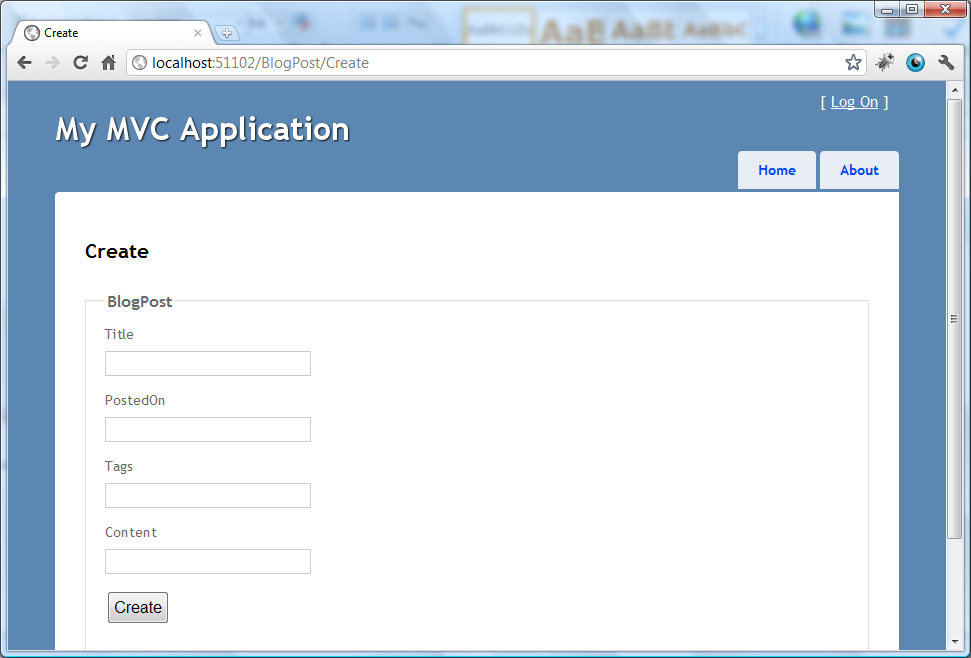
When we post it, we will get this result :
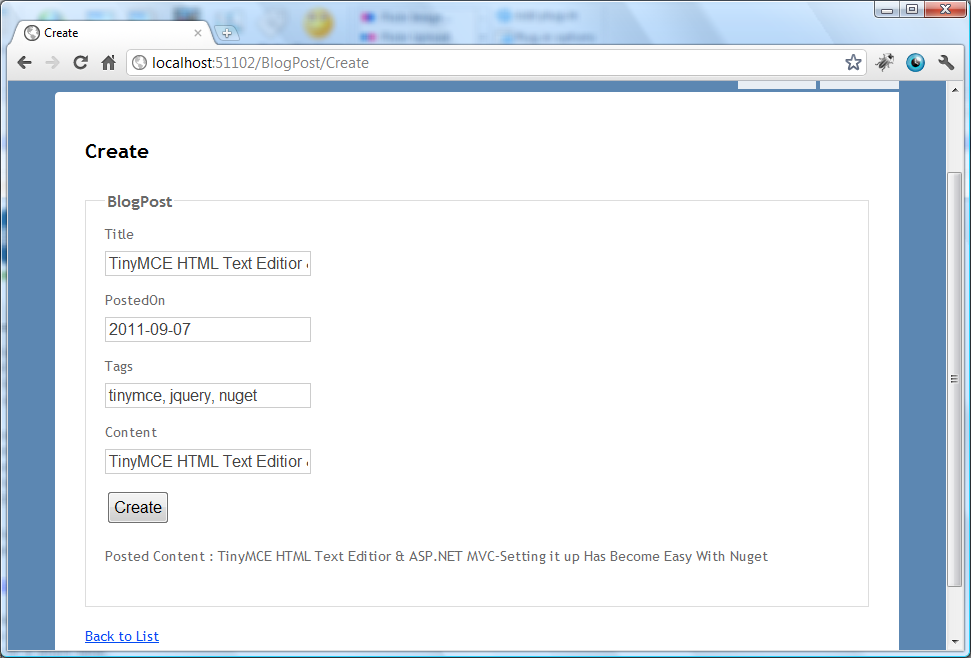
So, we got this baby working. Let’s improve it. What we need here is to give the blogger a real blogging experience. In order to do that, we need a text editor so that we could enter our content pretty easily.
First thing is to pull down the TinyMCE.JQuery.MVC package over the wire.

When you start installing the package, your solution will have a movement so don’t freak out ![]()
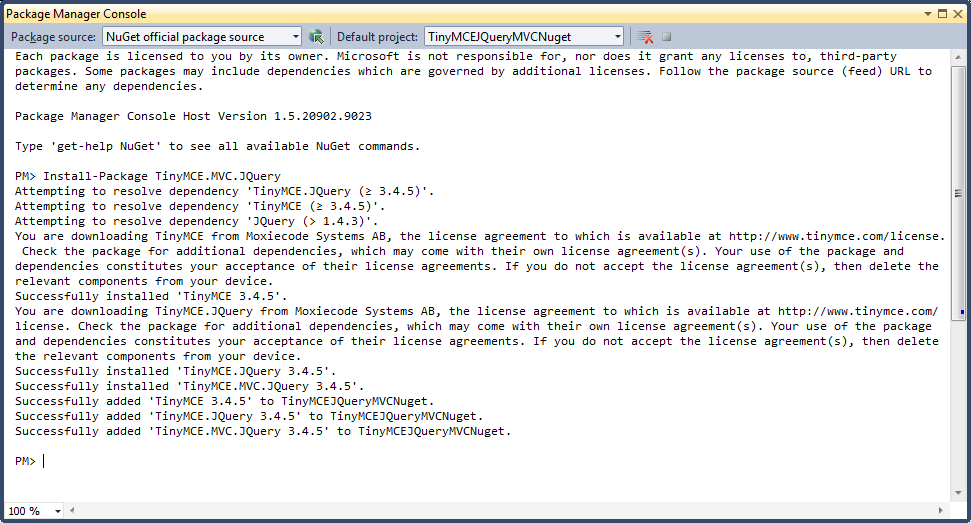
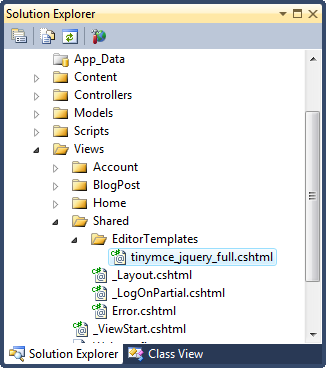
So now we have our package installed, we are ready to make some changes on our model. When you go to ~/Views/Shared/EditorTemplates folder on your solution, you will see that there is a cshtml file there called tinymce_jquery_full.cshtml. This partial view enables you to view your model property with TinyMCE editor.
I am not going to go inside this file and explain how to do this (however, it is pretty simple). It is entirely an another topic.
What I would like to point out here is this : if you are working with this package (TinyMCE.JQuery.MVC), you need to have JQuery referenced on your file. We have our JQuery referenced on our _Layout.cshtml file so we do not need to do anything else.
As I got the information from the project admins, TinyMCE can work with JQuery 1.4.3 and after. You don’t need to worry about that as well. Nuget will resolve the dependency without you knowing.
Change to Our Model
To get it work, we need to change our model as follows :
using System;
using System.ComponentModel.DataAnnotations;
using System.Web.Mvc;
namespace TinyMCEJQueryMVCNuget.Models {
public class BlogPost {
public string Title { get; set; }
public DateTime PostedOn { get; set; }
public string Tags { get; set; }
[UIHint("tinymce_jquery_full"), AllowHtml]
public string Content { get; set; }
}
}
What UIHint attribute does here is to tell the framework to use tinymce_jquery_full editor template instead of the default one. AllowHtml is also there to allow html string to pass from your browser to the server. Build you project and run it again and then you should see a page similar to following one:
If you are unable to see this when you run your application, this can be related to several things. First thing I would do is to check if the Content property is used with EditorFor instead of another Html Helpers :
<div class="editor-label"> @Html.LabelFor(model => model.Content) </div> <div class="editor-field"> @Html.EditorFor(model => model.Content) @Html.ValidationMessageFor(model => model.Content) </div>The second thing would be a JavaScript error related to misconfiguration or a wrong library reverence. Check your browser console for any JavaScript errors for that.
Now when we post it back to server, we will get it back as :
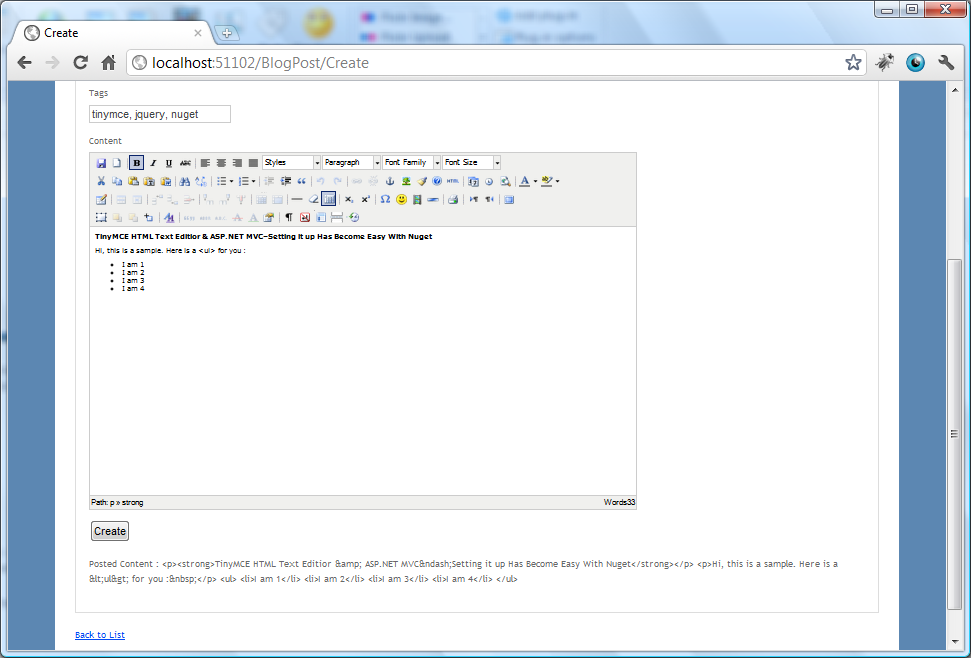
Very nice. Html has been created for us behind the scenes.
It displays it as encoded html because we didn’t specify to view as raw html. In order to do that, just use @Html.Raw.
I hope this will help you to automate some portion of your project as well.
Comments
Does this also install EditorTemplates that use a smaller subset of controls?
And if not, how easy is it to modify tinymce_jquery_full to use only a custom subset of controls?
@Lee
I was lazy a bit when I created the TinyMCE.MVC.JQuery package so I didn't put a EditorTemplate of lightweight version of TinyMCE.
I wouldn't modify the tinymce_jquery_full. What I would do instead is to create a new EditorTemplate for my needs.
Even I would make it a nuget package and put it there on the live nuget feed and take TinyMCE.MVC.JQuery package as dependency.
I will probably add more sample to my package but you could do that now if you want.
Yeah... to make good use of this, I would need to create smaller, customized Editor Templates. I often find that for a lot of client projects, offering every MCE control just confuses people.
"Trop de choix tue le choix" (Too much choice kills the choice)
@Lee
It is pretty easy to create an editor template as well.
You totally rock - thanks for doing all of the heavy lifting to get this setup!
@LanceLarsen
glad that it helped;)
This is terrible from an HTML injection standpoint. No protection at all.
@tobi
ha ha! here, you are looking at the wrong direction my dear.
This is awesome!
But it doesn't work :-((( The reason is because there are a number of references in both the MVC and JQuery packages to "tinymce.3.4.5" which doesn't exist.
But, it's easy to fix :-))) - just find "tinymce.3.4.5" and replace with "tinymce".
Also, the editor templates in the samples (tinymce_full.cshtml and tinymce_full_compressed.cshtml) have a line for:
content_css : "@Url.Content("~/Scripts/tinymce/css/content.css")",
It should read:
content_css : "@Url.Content("~/Scripts/tinymce/themes/advanced/skins/default/content.css")"
Hi there!
First of, great example of integrating TinyMCE into a MVC project. However, i struggled into a problem when integrating it into one of my projects (using nested models).
Instead of using "Viewdata.TemplateInfo.GetFullHtmlFieldName(string.Empty)" you should use "Viewdata.TemplateInfo.GetFullHtmlFieldId(string.Empty)" in order to select the textarea.
Greetz,
prunked
@prunked
Yes, you are right. It'll brake if you have different id and name attribute values. I should have it fixed and push a new version of the templates.
Thanks for the input!
Ran into the same issue prunked ran into when I dropped this into a project today.
Also noticed that the script references within tinymce_jquery_full.cshtml needed to be updated; the tinymce scripts were added to the project without a version number in the path.
@prunked
Thanks for finding that one.. it helped me get the editor to bind. I appreciate you coming back to help others with what you found.
Also thanks to @Tugberk for putting this together.
object is not supported _TMS
Realy easy to set up with Nuget! but how to set the plugins using Ajax: in my site i'm getting the content using Ajax call, but the plugin is not workink for my Partial View. however it's working when loading content without ajax.
I updated the package and now there should be no problems:
TinyMCE.MVC.JQuery 3.4.7 is stable and does not need any modification.
thanks a lot
hi how to modify Stored Text ???
@bahar
what do you mean by that?
Thanks @Tugberk for this package! Exactly what I am looking for! Thanks!
Tugberk,
First of all thanks a lot for sharing this code, it works like a charm.
I have two questions, in order to save the text to a database, how should I declare the coumn in my db?
Also, do you know how to set up the image upload function?
Tx,
Borrie
Brilliant,
I have been putting this off for a while as I had it all set up for Webforms and thought I will have to go through the whole learning experience again for MVC, but this soooo simple. Coming from someone who has set up a RTE in Classic ASP…lol.
I found you via SO and wanted to +1 you there but I only had 12 points and someone voted me down for asking a silly question so I can’t, but +1 from my heart anyway!
Cheers,
Mike.
@Tugberk,
nvarchar(MAX)
Cheers,
Mike.
Thanks for the great Post,
after I click the Create button I get this error
The current request for action 'Create' on controller type 'MailController' is ambiguous between the following action methods:
System.Web.Mvc.ActionResult Create_post(Rimonim.Models.MailDetail) on type Rimonim.Controllers.MailController
System.Web.Mvc.ActionResult Create(System.Web.Mvc.FormCollection) on type Rimonim.Controllers.MailController
Any help???
btw, Can you post the entire project as an example???
@Kulpem
Make sure to anotate Create_post method with HttpPost attribute as above.
Done that. thats why I'm surprised with this error
My mistake. I had another create function made by vs2010. Didn't know it's there.
Great Post. Thank you very much for sharing
Hi.
Is there a way I can use this on the same property in different places with different themes, e.g.. property: commentbox
[UIHint("tinymce_jquery_full"), AllowHtml]
public object PageContent { get; set; }
And elsewhere:
Cheers,
Mike.
Has anyone been able to get this to work in a jQuery, Colorbox or Dialog, I am so close, everything works but I can’t type into the box! I can type into the ‘HTML’ editor, upload an image, but I cannot type into the TestArea!
So close yet so far!
I think it's because TinyMCE needs to load after Colorbox or something???
Cheers,
Mike.
Hi
am getting error when checked in developer tool
Object#<Object> has no method tinymce
sorry jquery was referred at the bottom.now it works.
Great work, thank you!
This is wonderful! I really appreciate the work you did here. Ive been searching all over for this exact control. Amazing setup!
@Html.TextArea(String.Empty, /* Name suffix */
ViewData.TemplateInfo.FormattedModelValue /* Initial value */
)
System.ArgumentException
HResult=-2147024809
Message=Value cannot be null or empty.
Parameter name: name
Source=System.Web.Mvc
ParamName=name
StackTrace:
at System.Web.Mvc.Html.TextAreaExtensions.TextAreaHelper(HtmlHelper htmlHelper, ModelMetadata modelMetadata, String name, IDictionary`2 rowsAndColumns, IDictionary`2 htmlAttributes, String innerHtmlPrefix)
at System.Web.Mvc.Html.TextAreaExtensions.TextArea(HtmlHelper htmlHelper, String name, String value, IDictionary`2 htmlAttributes)
at System.Web.Mvc.Html.TextAreaExtensions.TextArea(HtmlHelper htmlHelper, String name, Object htmlAttributes)
at ASP._Page_Views_Shared_EditorTemplates_tinymce_jquery_full_cshtml.Execute() in c:\Users\egr\Google Drive\robot\site\newrobot\newrobot\Views\Shared\EditorTemplates\tinymce_jquery_full.cshtml:line 53
at System.Web.WebPages.WebPageBase.ExecutePageHierarchy()
at System.Web.Mvc.WebViewPage.ExecutePageHierarchy()
at System.Web.WebPages.WebPageBase.ExecutePageHierarchy(WebPageContext pageContext, TextWriter writer, WebPageRenderingBase startPage)
at System.Web.Mvc.RazorView.RenderView(ViewContext viewContext, TextWriter writer, Object instance)
at System.Web.Mvc.BuildManagerCompiledView.Render(ViewContext viewContext, TextWriter writer)
at System.Web.Mvc.HtmlHelper.RenderPartialInternal(String partialViewName, ViewDataDictionary viewData, Object model, TextWriter writer, ViewEngineCollection viewEngineCollection)
at System.Web.Mvc.Html.PartialExtensions.Partial(HtmlHelper htmlHelper, String partialViewName, Object model, ViewDataDictionary viewData)
at System.Web.Mvc.Html.PartialExtensions.Partial(HtmlHelper htmlHelper, String partialViewName)
at ASP._Page_Views_Admin_CreatePageForm_cshtml.Execute() in c:\Users\egr\Google Drive\robot\site\newrobot\newrobot\Views\Admin\CreatePageForm.cshtml:line 10
at System.Web.WebPages.WebPageBase.ExecutePageHierarchy()
at System.Web.Mvc.WebViewPage.ExecutePageHierarchy()
at System.Web.WebPages.StartPage.RunPage()
at System.Web.WebPages.StartPage.ExecutePageHierarchy()
at System.Web.WebPages.WebPageBase.ExecutePageHierarchy(WebPageContext pageContext, TextWriter writer, WebPageRenderingBase startPage)
at System.Web.Mvc.RazorView.RenderView(ViewContext viewContext, TextWriter writer, Object instance)
at System.Web.Mvc.BuildManagerCompiledView.Render(ViewContext viewContext, TextWriter writer)
at System.Web.Mvc.ViewResultBase.ExecuteResult(ControllerContext context)
at System.Web.Mvc.ControllerActionInvoker.InvokeActionResult(ControllerContext controllerContext, ActionResult actionResult)
at System.Web.Mvc.ControllerActionInvoker.<>c__DisplayClass1a.<InvokeActionResultWithFilters>b__17()
at System.Web.Mvc.ControllerActionInvoker.InvokeActionResultFilter(IResultFilter filter, ResultExecutingContext preContext, Func`1 continuation)
InnerException:
Everybody HELP,
On local it is work, but I deloy on host it's not work.
It no show any error message. but it not getting tinymce_jquery_full.cshtml file in EditorTemplates.
Server use IIS6 , OS 2003.
Thank all,
Awesome post man ! Now even I am using tiny mce editor on my blog http://www.yassershaikh.com which is made using MVC 3 :)
Thank you for this great package.
I was able to run this in a fresh MVC Application. However, if I integrate it in an already established application it does not work. Although it can change the "text box" into "textarea", it does not show the WYSIWYG.
My web application's _Layout has some jquery plugins installed. Could that be conflicting with this package?
Please help me here. Thank you.
Thanks for the good work; I will follow your approach.
Q. is the image upload used in this blog free or purchased. I am searching for free open-source image upload plugin to be used within TinyMCE that I can use in my MVC project to upload images from local drive.
when I do
<div class="editor-label">
@Html.LabelFor(model => model.Section.Description)
</div>
<div class="editor-field">
@Html.EditorFor(model => model.Section.Description)
@Html.ValidationMessageFor(model => model.Section.Description)
</div>
in html it looks like
</textarea>
and generated js is
$('#Section.Description').tinymce({
but must be #Section_Description
Could you give me some idea about changing the mode? I can change the editor to readonly by clicking a button to call tinyMCE.get('editorID').getBody().setAttribute('contenteditable', 'false');
and change it back by clicking another button to call
tinyMCE.get('editorID').getBody().setAttribute('contenteditable', 'false');
But how to initialize the editor to readonly?
Thanks in advance.
I hv test it work, thanks
But seems there are some issue when i tried to use 2 or more WSIWYG editor in a page
public class MyDTO
{
[UIHint("tinymce_full_compressed"), AllowHtml]
public string Requirement { get; set; }
[UIHint("tinymce_full_compressed"), AllowHtml]
public string Description { get; set; }
Hi there!
@Evgeni: This is because the editor template is using "GetFullHtmlFieldName(string.Empty)" instead of "GetFullHtmlFieldId(string.Empty)". Just change it in the editor template, and it will work ;)
@tugberk: Still not fixed? ;)
@dynlist: Unfortunately, "readonly: true" (see http://www.tinymce.com/wiki.php/Configuration:readonly) hides all ui elements of tinymce. If you just want to set the "contenteditable: false" on init, add the following to your template:
oninit: function () { tinyMCE.get('@ViewData.TemplateInfo.GetFullHtmlFieldId(string.Empty)').getBody().setAttribute('contenteditable', 'false'); }
This should do the trick...
@Jacob Handaya: Couldn't reproduce this issue, tried it with your dto and a child dto also containing a tinymce editor, resulting in showing up 3 editors. Make sure you didn't define the editor for one property twice, this would, for example, cause this problem. Otherwise, some more code would be good (the view etc... A small demo application would be great ;) ).
Greate Work!
running in ASP.NET MVC4 , no matter where the tinymce script is registered (int the _Layout file, btw) ,i'm getting a javascript error:
Uncaught TypeError: Object [object Object] has no method 'tinymce'
the script get the field name properly, but is unable to execute thr tinymce commands.
any help will be greatly appriciated !
Excellent! Thank you very much for the Nuget Package! It makes adding TinyMCE to MVC Projects much easier!
Pete
TinyMCE editor didn't appear for asp.net MVC 4. I believe this could be because of correct js reference is not getting appended. I can able to see that it comes with textarea editor but it is not coming up with fancy tinyMCE buttons and all. Appreciate your input.
Thanks.
Sorry i just figure it out that i didn't uncomment jquery reference comment with correct version. Thank you again and you did a great job, it was very helpful.
Two Instance on same page?
This Works
public class TinyMCEModel {
[AllowHtml]
[UIHint("tinymce_full_compressed")]
public string Content { get; set; }
public string Content2 { get; set;}
}
This Doesn't
public class TinyMCEModel {
[AllowHtml]
[UIHint("tinymce_full_compressed")]
public string Content { get; set; }
[AllowHtml]
[UIHint("tinymce_full_compressed")]
public string Content2 { get; set; }
}
Any Advice??
Happy to email project if you like
@Pat Tormey:
Two TinyMCE instances on the same page should not be a problem.
What happens if you have both instances on the page? Is only the first one showing up? Or is no TineMCE displayed at all?
What browser do you use? Did you check the browser console (in Internet Explorer > 6 or Chrome, press F12 to display the developer tools, and switch to (JavaScript) console; in Firefox i guess you need to install FireBug first, after that, F12 and switch to console)?
You can also send a small example demonstrating the problem to falcon4u[at]gmx[dot]net, i'll have a look at it then.
Wish you all a happy new year ;)
Greetz,
prunked
>Two TinyMCE instances on the same page should not be a problem
I completly agree ;)
In IE it throws an error
JavaScrip runtime Object doesn't support the action
ref to tinymce line 1 col 139969 unhandled exception
Same error in chrome but doesn't break on it.. Prolly my cofig
If allowed to continue only the second instance is tinyMce first is just textarea
@Pat Tormey:
I was able to replicate your problem (and possibly it's the same problem @Jacob Handaya had). There seems to be some issues when loading the tiny_mce.js more than once (at least using the TinyMCE.MVC package).
To fix it, you can remove the following line
<script src="@Url.Content("~/Scripts/tinymce/tiny_mce.js")" type="text/javascript"></script>
from the editor template and place it in your head section of your layout-file / masterpage.
Or, if possible, switch to the TinyMCE.MVC.JQuery package (didn't have any problems with it except the one using nested models i already commented ;) ).
THANKS!.. Sounds like that should work.. I really appreciate the speedy resppnse..
Hi,
I have downloaded the TinyMCE.MVC.Jquery and TinyMCE.MVC.Jquery.Sample into a new MVC.NET 4 project, however I cannot seem to get it to show in the sample TinyMCESampleJQuery cshtml page.
I only changed the content_css: "@Url.Content("~/Content/Site.css")", to point to my stylesheet and added the jquery and tinymce references
<script src="@Url.Content("~/Scripts/tinymce/jquery.tinymce.js")" type="text/javascript"></script>
<script src="@Url.Content("~/Scripts/jquery-1.7.1.min.js")" type="text/javascript"></script>
@mcver:
Could you try the following?
The content_css option is not necessarily needed, it's for styling the content area of the TinyMCE instance. IMHO i would remove it.
That should do the trick.
Greetz,
prunked
@prunked
Excellent thanks moving the scripts bundle of jquery did the trick!
Thanks a lot!
2nd Rendering Of Partial View does not work.
I have my EditorFor loading correctly the first time it is loaded on a page in a Partial. I have a list with editable items that i edit in a partial.
When i use ajax to reload that partial, the tinyMCE is properly loaded, but the xxx_parent div is set to display:none. Any idea what is causing this?
ie: span role="application" aria-labelledby="ObjectiveText_voice" id="ObjectiveText_parent" class="mceEditor defaultSkin" style="display: none;"><span class="mceVoiceLabel" style="display:none;"
if i put in an alert before the .tinyMCE call in the EditorTemplate i can see it visible, but as soon as it finishes rendering the partial it is somehow set to display:none
This only happens if the previous instance is not removed. If i do xxx.tinyMCE().remove() in the console window and then click the edit button it works.
@Niall:
Sounds weird... Could you send me a small VS2010/2012 example solution demonstrating the problem (falcon4u[at]gmx[dot]net)? I'd like to have a look at this one ;)
Still need some help
VS 2012, MVC latest. clean new project
Copy exactly as shown above
0x800a01b6 - JavaScript runtime error: Object doesn't support property or method 'tinymce'
I'm guessing there is something odd about the loading order but since it crashes I can't see it..
Any help?
@Pat Tormey:
It seems that "jquery.tinymce.js" is not loaded correctly. Could you please check the script path in your editor template?
Just to avoid confusion that came to my mind after reading my comments:
>> Remove the script reference to jQuery from the editor template.
was not meant to be read as "remove the jquery.tinymce.js reference" ;)
If that was not the case, a small sample would be great to dig into this...
BTW: Which version of IE did you use?
Unable to view the editor control what might be the issue
@Dorababu:
Depends on what package and what MVC version you are using. Check the following:
- The script reference in the editor template is correct.
- Your property is annotated with the UIHint attribute and the editor template you want to use.
- In your view, you use the Html.EditorFor helper (neither Html.TextAreaFor nor Html.TextBoxFor will render the editor template).
- When using the tinymce.mvc.jquery-package with MVC4, make sure that you moved "@Scripts.Render("~/bundles/jquery")" into the head section.
- Check your browser for script errors. They often will give you a hint of what's going wrong...
greetz,
prunked
How can i make the editor resizeable plz..Thanks for the realy nice tutorial.
@Avinash:
When using the advanced theme, you can set 'theme_advanced_resizing' to true to make your editor resizable...
See this jsfiddle (link to documentation: here)
greetz,
prunked
I have added tinyMCE in MVC3 project added the required files but I am not able to get the updated value of textarea as i am updating in the editor texarea..
Could you please help me out i am sure i am missing something and what is that i am not getting.Please help me.
Good Stufff thanks,
'I try install TinyMCE.MVC.JQuery on my MVC4 , JQuery_1.9.1.min.js It give me a error
0x800a01b6 - Microsoft JScript runtime error: Object doesn't support this property or method
I guess it's not support JQuery _1.9.1.min.js
or what is the reason?
thanks
First off, sry for the late response, have been more then busy these days...
@raj:
As far as i remember, the content of the underlying textarea is updated on the form->onsubmit event. If you'd like to keep the content of the TinyMCE instance sync with your textarea, maybe you could use some sort of onChange event listener (see http://www.tinymce.com/wiki.php/API3:event.tinymce.Editor.onChange). Could be something like this:
setup: function(ed) {
ed.onChange.add(function (ed) {
ed.getElement().innerHTML = ed.getContent();
});
}
Although i would recommend to just keep the original behavior and let TinyMCE keep your textarea synced...
@Frank:
Sounds like you're having the same problem as Pat Tormey. Make sure you removed the jquery script reference from your editor template, and load jquery before the TinyMCE instantiation (e.g. moving the jquery bundle to your head section).
greetz,
prunked
Hi I keep getting a javascript error.
I instead of using the tinymce_jquery_full.cshtml EditortTemplate, I switched it to use "tinymce_full.cshtml" EditorTemplate and then it works.
---------------------------------------------
Hi I keep getting a javascript error.
is this now deprectaed? it looks like the MVCD stuff pulls in old versions of the tinymce package.
@spognman:
Unfortunately, it seems like the NuGet package (at least the MVC ones) are not maintained anymore. But you can always keep your TinyMCE files up-to-date by downloading and replacing the original files with the downloaded ones...
@tugberk: Any updates planned for the MVC packages? If not, maybe you can add me on NuGet in order to update / maintain the existing ones... ;)
asdasdasdasd
asdasdasdasda sadas d
Value cannot be null or empty.
Parameter name: name
Description: An unhandled exception occurred during the execution of the current web request. Please review the stack trace for more information about the error and where it originated in the code.
Exception Details: System.ArgumentException: Value cannot be null or empty.
Parameter name: name
Source Error:
Line 51: </script> Line 52: Line 53: @Html.TextArea(string.Empty, /* Name suffix */ Line 54: ViewData.TemplateInfo.FormattedModelValue /* Initial value */ Line 55: )What reference can i add in _layout page?
I am not getting this type of output,
please help me
It's working finr for me,
But at the time of inserting data in to database i am getting an error like this
ERROR:
A potentially dangerous Request.Form value was detected from the client (Specifications="<p><span style="colo...").
It's working for me,
I want to Insert data to database,At the time of inserting data i am using one word color red,At the time of display also same data will display it,
How can i do this?
Inserting also inserted,Displying also not a problem all are working,
At the time of Editing time textbox not appearing TinyMCE HTML Text Editior,
How can i do same as inserting mode type of texteditor in the editing mode also
@anil:
seems like you resolved your first issue with the potentially dangerous request form value ;)
to your last question: do you want to update/sync the content of the underlying textarea with the content of the tinymce instance? normally, tinymce will hook into the form submit event and update the textarea itself; if you want to take control over this by yourself, you should be able to add a onchange event listener to those tinymce instances:
setup: function(ed) {
ed.onChange.add(function (ed) {
ed.getElement().innerHTML = ed.getContent();
});
}
if i misunderstood your question, could you please clarify it?
Are you planning to update this to tinymce 4.x?
Out the box it does not appear to be working with the current versions as there were breaking changes between 3.x and 4.x
Lots of spam in this thread...
@Bob: I just had a look into that, and yeah, out of the box it does not seem to be supported, but i made it work with a few changes. If i have some spare time in the future, i will try to create an update package to support TinyMCE 4.*. As the TinyMCE package itself is being maintained by @tourismgeek and @spocke, i suggest this should not be a problem.
By the way: What package are you using right now? I have some ideas for fixes mentioned in the comments in this thread that i'd like to include when creating the update, so i'd like to know on which one i should concentrate on ;)
Greetz,
prunked
I'm using MVC4. If I put:
@Html.TextAreaFor(model => model.notes)
@Html.ValidationMessageFor(model => model.notes)
It displays the editor, but changes don't get passed through to the controller. I can also find 2 copies of the text in the markup, one that changes when I change stuff in the editor, one that does not.
If I put (just as above):
@Html.EditorFor(model => model.notes)
@Html.ValidationMessageFor(model => model.notes)
The editor does not appear, but modifications get passed through to the controller. What could be wrong?
Like atang I am also keep getting this javascript error.
TypeError: $(...).tinymce is not a function
Your article help me very much.
But when i submit form the javascript errored as follow
Unhandled exception at line 826, column 4 in http://localhost:1812/Scripts/jquery.validate.js
0x800a01b6 - JavaScript runtime error: Object doesn't support property or method 'split'
I created the project with VS2012 and use Basic Template with default all javascripts file.
How can i resolve it?
Thank you.
@Chockolate:
Depends on what package and what MVC version you are using. Check the following:
- The script reference in the editor template is correct.
- Your property is annotated with the UIHint attribute and the editor template you want to use. Also make sure it is annoted with the AllowHtml attribute, otherwise you will get a request validation exception...
- In your view, you use the Html.EditorFor helper (neither Html.TextAreaFor nor Html.TextBoxFor will render the editor template).
- When using the tinymce.mvc.jquery-package with MVC4, make sure that you moved "@Scripts.Render("~/bundles/jquery")" into the head section in your _Layout.cshtml.
- Check your browser for script errors. They often will give you a hint of what's going wrong...
If this doesn't help at all, please provide a sample project demonstrating the problem.
@NMathur:
Open your _Layout.cshtml. You should find a line like '@Scripts.Render("~/bundles/jquery")'. Move this line into your head section of your layout file. Should fix the problem ;)
@Nop:
Can you provide either
greetz,
prunked
I was wondering why so many people could get this to work and not me... I now realise it is all SPAM!!!
I take it that this page is no longer relevant and is a waste of time. It certainly does not work for MVC4 anyway. This project seems to be dead so I am going to forget about tinymce and move onto a different editor that is supported by asp.net.
Screw this tinkering about for hours trying get this crap to work. I have wasted 2 hours on this already.
I like Tinymce but I do not think this package is worth it. I could not get it to work anyway. I am now using jHtmlArea which probably has a fraction of the amount of downloads as what tinymce has. That was fairly easy to set up and it suits me ok for the moment.
Maybe I will come back to Tinymce when I have the time to waste messing about with it to make it work.
OMG!
Me again... now I understand why this project was abandoned.
I just checked on the home page of tinymce. You simply put a couple of lines of code into the head of the layout page and its job done! it is seriously as easy as that now. Obviously you have to set your model string value to [AllowHtml][DataType(DataType.MultilineText)] as well of course.
Never mind. I guess it is best to just go straight to the source sometimes :p
Thank you for your response.
It's error in development environment only.
I use jquery version 1.8.2 and jquery.validate.js version 1.10.0
and 1 more question.
How can i set TinyMCE to enable upload file from my local computer to the server?
Thank you.
What about sanitizing the html?
@nop:
finally i got some time to look at it.
the error line references to a string split function of the class attribute of your input field (which holds the validation classes used by jquery.validation). i guess there might be an issue with applying the validation classes to the editor area which is rendered using an iframe.
updating to a more recent tinymce.jquery version might resolve the issue (see this on stackoverflow: http://stackoverflow.com/questions/10981120/jquery-validate-js-javascript-error), but i'm not sure right now (at least, that is what was accepted as the answer...)
hth
greetz,
prunked
Hi,
I also have similar problem with tiny mce and jquery.validate plugin. Using the tiny mce simply delete the class="valid" from my control and make all the validation not working.
and updating to latest tinyMCE(v 4.0.12) is not working at all.
Thanks
Great stuff!!! Using it with MVC5 and the default layout puts the jquery library files at the bottom of the layout, so had to move those up to the head section in order for jquery to be up and running with the tinymce files came in.
Thank you so much for this!!
@nop @saktya:
spending some more time on that issue, i was (hopefully) successful in resolving it.
1) Update the TinyMCE.JQuery package to the latest branch of v3.x via package manager console (in Visual Studio, View->Other Windows->Package Manager Console). You can do this by entering "Install-Package TinyMCE.JQuery -Version 3.5.8", installing the latest version of the TinyMCE v3.x branch.
This should already get you rid off the javascript split error. Unfortunately, client side validation is not yet working as the original textarea is hidden, and jquery.validation ignores these hidden fields.
2) Add a new js-file in your scripts folder, containing the following:
$.validator.setDefaults({
ignore: ':hidden:not([data-val="true"])'
});
Reference this file in your Layout-/MasterPage-file, or add it to the ScriptBundle in your App_Start\BundleConfig.cs.
Now, all hidden fields that have a data-val-attribute set to true are being validated, too.
greetz and a happy new year!
prunked
I will try as your suggestion.
Thank you very much, PRUNKED
I have one more question.
How can i integrate TinyMCE with dynamic form control?
For example:
In form, user can add more TinyMCE control as required by click 'Add Choice' button